
Polymarket Analytics Review: Whale Tracker, Leaderboard and Wallet Data


Polymarket Analytics turns Polymarket's public trading data into trader leaderboards, whale alerts and wallet histories you can search in seconds. Browsing it costs nothing, but it isn't run by Polymarket, and since March 2026 it has belonged to a copy-trading company. This guide covers what the tool does, what it costs and how to read its numbers without being misled.
Features and pricing checked October 16, 2026.
Polymarket Analytics at a Glance
Here's the quick read before we dig in. Each row reflects the live site and its published pricing page as of our most recent check.
| Detail | Polymarket Analytics |
|---|---|
| 🔗 Official site | polymarketanalytics.com (type it directly or use a bookmark) |
| 🏢 Owner | PolyGun, a Telegram copy-trading bot, since March 2026 |
| 🛠️ Built by | Primo Data, an independent prediction market data developer |
| 📈 Platforms covered | Polymarket for trader and wallet data; Kalshi appears only in market price comparisons |
| 💲 Price | Free tier; Premium costs $20 per month |
| 🔑 Wallet needed | No for browsing; yes for portfolio tracking or trading through linked tools |
| 🔌 API | Falcon API, a separate business product with pricing by request |
| ⭐ GamingToday verdict | One of the best free ways to research Polymarket traders, as long as you treat it as research, not a signal service |
What Is Polymarket Analytics?
Polymarket Analytics is an independent data dashboard that ranks Polymarket traders, tracks large trades and shows the full position history of any public wallet. It reads trading activity recorded on the blockchain, so most of it works without an account. It is a research tool, not an exchange, and it does not hold your money.
The idea works because Polymarket settles trades on the Polygon blockchain, which leaves every wallet's activity visible to anyone. That raw record is hard to read, so the site packages it into leaderboards, market dashboards and profit-and-loss breakdowns. It's one of several research platforms we cover in our prediction market tools hub, and it's most useful once you understand how event contracts are priced. If that part is still new, our complete guide to prediction markets covers the basics.
At the time of its sale, the site said it tracked more than 2.3 million traders, roughly 184,000 markets and about 120 million positions, with more than 250,000 users. Treat those figures as a snapshot from March 2026 rather than current totals.
Is Polymarket Analytics Run by Polymarket?
No. The name causes plenty of confusion, but Polymarket Analytics is a third-party site. It belongs to Polymarket's Builders Program, a partner network for outside developers who build on Polymarket's data, which gives it a working relationship with the exchange without making it part of the company. Anything you do on the site stays separate from your account on Polymarket itself, and the exchange doesn't vouch for the trades or traders the dashboard highlights.
Who Owns Polymarket Analytics?
As of October 2026, Polymarket Analytics is owned by PolyGun, which announced the acquisition on March 9, 2026. Financial terms weren't disclosed.
PolyGun runs a trading bot inside Telegram. Users create a wallet in the bot, fund it and then place trades, set limit orders or automatically copy the activity of wallets they choose. Its public listing shows a 1% fee on each transaction, so its revenue grows when more people trade, and especially when they copy other traders.
That matters for how you read the site. When the deal was announced, PolyGun said it planned to fold Polymarket Analytics data directly into its trading product, and the dashboard now carries a Copy Trade link and a Try Bot button that lead to PolyGun. None of that makes the data wrong, but the owner earns money when you act on it, so weigh its leaderboards with that incentive in mind.
| Ownership Detail | What We Found |
|---|---|
| 📅 Deal announced | March 9, 2026 |
| 🤝 Buyer | PolyGun, a Telegram-based Polymarket trading and copy-trading bot |
| 💵 How the buyer earns | A 1% fee per transaction, according to its public listing |
| 🧩 Stated plan | Integrate Polymarket Analytics data into PolyGun's trading tools |
| 👀 What you'll notice | Copy Trade and Try Bot links throughout the dashboard |
Polymarket Analytics Features
The dashboard covers six main jobs: spotting big money, ranking traders, auditing wallets, researching markets, feeding data to developers and, through its owner, copying trades. Here's what each one does and where it falls short.
Whale Tracker
The whale tracker, found under the Whales tab in the traders section, surfaces the largest recent trades and lets you filter by market, wallet or trade size. It's the fastest way to see where serious money is landing on a breaking story or a late-moving sports market. Remember that a big trade only tells you what one wallet paid; it doesn't tell you whether that wallet is any good, which is why the leaderboard and profile pages matter more.
Trader Leaderboard and P&L
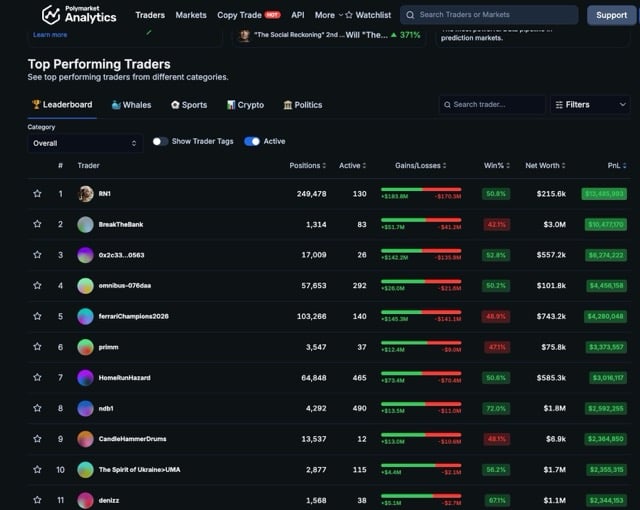
The Polymarket leaderboard on this site ranks traders by realized profit, win rate, volume or return, and each name links to a full position history. The site labels its biggest winners "sharp money" and its biggest losers "dumb money," which makes for quick browsing but oversimplifies things. Sorting by category helps a lot: a wallet that thrives on election contracts may lose steadily on football.
Wallet Lookup and Portfolio Tracker
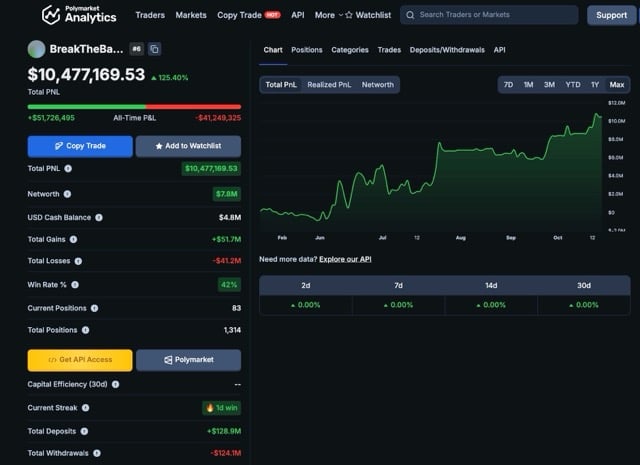
Paste any public wallet address and you'll see its open positions, entry prices, realized and unrealized profit and loss, and trade history. You can also connect your own wallet to follow your positions in one place, and Premium adds more advanced portfolio tracking. Looking up someone else's wallet never requires connecting yours.
Market Pages, Historical Data and Open Interest
Each market page works like a Polymarket dashboard, with price history for live and resolved markets, candle data you can export, 24-hour volume, liquidity and open interest. Multi-outcome events are grouped together with the implied probability of each outcome, and a watchlist keeps the markets you follow in one spot. Market pages also include a Polymarket vs. Kalshi price comparison, the main place Kalshi shows up on the site.
API and Data Exports
Developers get a separate product called the Falcon API, which serves market records, trades, order books, wallet profit and loss, win rates and whale activity. It's sold as business access, with pricing available only by booking a call, and it also offers a connection for AI assistants. Casual users won't need it, since the dashboard and its candle exports cover most research.
Copy Trading Through PolyGun
Polymarket Analytics doesn't copy trades itself. Its Copy Trade link sends you to PolyGun, the Telegram bot that owns the site, where you can automatically mirror a chosen wallet's trades. We cover the risks in the trader-data and safety sections below, but the short version is that copying a wallet means buying later, often at a worse price, and paying a fee on every trade.
How to Use Polymarket Analytics: Step-by-Step Guide
This six-step routine takes you from the homepage to a decision you can defend. You don't need an account or a wallet for any of it until you choose to trade, and the trade itself always happens on a regulated exchange, not on the analytics site.
- Open the official site. Type polymarketanalytics.com into your browser or use a saved bookmark. Skip links from social media replies and direct messages, where lookalike sites are common.
- Filter traders by category. Head to the traders section and narrow the leaderboard to the topic you actually trade, such as politics, sports or economics, so you're comparing like with like.
- Open a trader profile. Check how many markets the wallet has traded, how long it has been active and how its profit is spread across those markets.
- Run the wallet through our checklist. Use the six questions in the next section to decide whether the record holds up or rests on luck.
- Look up the market itself. Open the market page to compare the trader's entry price with today's price, and review volume, liquidity and open interest before you assume there's still value.
- Decide on your own terms. If the trade still makes sense at the current price, size it to your bankroll on your exchange. If it doesn't, move on; there's always another market.
Our prediction market trading strategies guide goes deeper on position sizing and when following other traders makes sense.
How to Read Trader Data Without Being Misled
Leaderboards are persuasive because they look objective. The numbers are accurate, but they answer narrower questions than most people assume. These five traps catch new users most often.
Win Rate vs. Profit and Loss
A high win rate can hide a losing trader. Someone who keeps buying 92-cent favorites might win nine times out of 10 and still lose money, because one miss wipes out several small gains. Profit and loss tells you whether the strategy actually pays, while win rate only tells you how often it feels good. Our implied probability calculator shows what a price says about the odds, which helps you judge whether those wins were ever good value.
One Big Bet vs. a Real Track Record
Plenty of wallets near the top of a leaderboard got there with a single large, correct call. Open the position history and check how the profit is spread. If one market accounts for most of it, you're looking at a lucky ticket, not a repeatable process.
Volume vs. Open Interest
Volume counts every contract traded, so heavy back-and-forth flipping can make a market look busy. Open interest counts the contracts still held, which better reflects how much money is actually committed to an outcome. A market with huge volume but thin open interest may have far less conviction behind its price than it appears.
Survivorship: Why Leaderboards Flatter
A leaderboard shows you the winners still standing. Thousands of wallets tried similar strategies, lost and stopped trading, and they never appear at the top. Some of today's leaders are skilled, but some are simply the luckiest survivors of a very large field, and the board can't tell you which is which.
The Copy-Trading Lag
By the time a trade shows up on the dashboard, the price has often moved. If a wallet bought at 30 cents and you follow at 45, you need the outcome to happen more often just to break even, and a 1% fee per trade on a copy bot adds to that gap. The edge you're copying shrinks every second you wait.
Put those lessons to work with the checklist below. Tick each statement that holds true for the wallet you're studying, and the score updates as you go.
Is This Wallet Worth Following?
Open a trader profile on Polymarket Analytics and tick every statement that's true.
Score: 0 of 6
Research aid only, not financial advice. A high score doesn't mean a trader's next position will win.
Is Polymarket Analytics Free?
Yes, the core dashboard is free. Leaderboards, market analytics, trader profiles and whale tracking all work without paying or signing up. Premium mainly lifts the limits on saved items and improves portfolio tracking. Here's how the published plans compare as of October 16, 2026:
| Plan | Price | What You Get |
|---|---|---|
| 🆓 Free | $0 | Full market analytics, trader leaderboards and whale tracking; up to seven saved markets, traders, tags and creators |
| ⭐ Premium | $20 per month (discounted yearly billing available) | 1,000+ favorites and saved views, priority data refresh, advanced portfolio tracking and early access to new features |
| 💎 Elite | 1 ETH one-time payment (listed as coming soon) | Everything in Premium plus lifetime access, a private Telegram group and priority support |
| 🔌 Falcon API | Pricing by request | Separate business product for market, trade and wallet data |
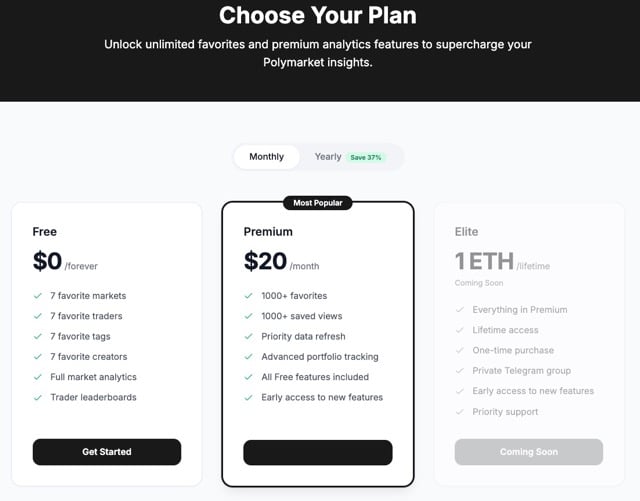
One inconsistency is worth knowing about. The homepage says paid plans add API access, alerts and larger data exports, but the pricing page lists none of those features under any plan, and API access is sold separately. Confirm exactly what's included before you pay, and don't buy Premium expecting built-in alerts.
Is Polymarket Analytics Legit and Safe?
Polymarket Analytics is a legitimate, widely used research site, and simply browsing it carries little risk because it only displays public data. The risks start when you connect a wallet or follow its links into trading tools. Use this checklist every time.
- Know what it reads | Leaderboards, profiles and market pages come from public blockchain records. Nothing about researching other traders requires your personal information.
- Know when it asks for a wallet | Connecting a wallet is only needed for tracking your own portfolio. If you don't need that feature, don't connect one.
- Sign messages, not transactions | Logging in with a wallet should only ask you to sign a message proving ownership. A request to approve a transaction or token spending on a research site is a red flag, so close the tab.
- Never share a seed phrase | No legitimate analytics site, bot or support agent will ask for your seed phrase or private key. Anyone who does is trying to drain your wallet.
- Factor in the ownership change | Since March 2026, the site has belonged to a copy-trading company that earns fees on trades. Its data can be accurate and still be presented in ways that encourage you to trade more.
Copy-trading bots deserve extra caution. Funding a bot wallet means trusting its software with your money, and automatic copying can place trades you'd never choose on your own. Start small if you try one at all.
Can US Traders Use Polymarket Analytics?
Yes, anyone in the US can browse Polymarket Analytics, since reading public market data isn't trading. Placing a trade is a different matter, because that happens on an exchange, and the exchange you use depends on where you live.
Polymarket's international platform isn't available to US users. Traders in the US can use Polymarket US, the company's CFTC-regulated exchange, or Kalshi, which is also regulated by the CFTC. Availability of some contracts, especially sports, can vary by state. Don't use workarounds to reach the international platform; it breaks the platform's terms and can leave your funds frozen.
Keep one wrinkle in mind. Much of the wallet data on Polymarket Analytics reflects activity on Polymarket's on-chain international platform, so a top trader's markets and prices may not line up exactly with what you see on Polymarket US. Our best prediction market sites rundown covers the legal options in more detail, and if you're weighing an exchange, our Kalshi review explains how its markets and fees work.
Deposit $10, Get a $25 Trading Bonus
Live Trade with the Biggest Payouts at the Largest Prediction Market in the World
Deposit $10, Get a $25 Trading Bonus
Live Trade with the Biggest Payouts at the Largest Prediction Market in the World
Polymarket Analytics Pros and Cons
The free tier does more than most paid tools, but the ownership change and a few gaps keep it from being a complete research setup.
Pros
- Generous Free Tier | Leaderboards, whale tracking, wallet lookups and market analytics all work without an account or payment.
- Deep Wallet Histories | Every profile shows positions, entry prices and realized versus unrealized profit, so you can audit a trader in minutes.
- Useful Market Context | Open interest, liquidity, price history and grouped event probabilities sit side by side on each market page.
Cons
- Owned by a Copy-Trading Business | PolyGun earns fees when users trade, and Copy Trade links appear throughout the dashboard.
- Limited Kalshi Coverage | Kalshi shows up only in price comparisons, with no Kalshi leaderboards or wallet data.
- No Clear Alert Feature | The pricing page doesn't list alerts in any plan, so you'll need another tool for real-time notifications.
Other Polymarket Analysis Tools Compared
Polymarket Analytics covers a lot for free, but other Polymarket analysis tools do specific jobs better. The table groups the main options by what you'd actually use them for. Third-party prices were checked in October 2026 and can change.
| Tool | What It Does | Platforms | Price | Wallet Needed | Places Trades |
|---|---|---|---|---|---|
| 📊 Polymarket Analytics | Trader leaderboards, whale tracking, wallet histories and market data | Polymarket (Kalshi price comparisons only) | Free; Premium $20 per month | No for browsing | No, but links to PolyGun's copy-trading bot |
| 🐋 Unusual Predictions (formerly Hashdive) | Smart Scores, insider-style flags and whale tracking | Polymarket | Included with Unusual Whales Retail plans from $50 per month | No | No |
| 🏆 Polymarket leaderboard and activity tab | Built-in top-trader rankings and a live feed of recent trades | Polymarket | Free | No for browsing | Trades happen on Polymarket itself |
| 🔎 Polywhaler | Whale alerts focused on large trades | Polymarket, Kalshi | Free; Pro $9 per month | No | No |
| 📉 Kalshinomics | Kalshi market dashboard with volume and price data | Kalshi | Free | No | No |
| 🧮 GamingToday calculators | Arbitrage and implied probability math for any price | Any platform | Free | No | No |
Unusual Predictions
The successor to Hashdive is the deepest paid option for scoring wallets and flagging unusual bets ahead of news. It costs far more than Polymarket Analytics Premium, so it makes sense only for frequent traders. Our Hashdive and Unusual Predictions review breaks down what changed after the rebrand.
Polymarket's Built-In Leaderboard
Polymarket's own leaderboard and activity tab are the simplest free starting point. They show who's winning and what's trading right now, without filters as deep as a dedicated dashboard, and nothing pulls you toward a third-party bot.
Whale-Alert Trackers
Tools like Polywhaler focus on one job: telling you when a big trade lands. They're handy for spotting momentum quickly, but they inherit the same copy-trading lag described above, so use alerts as a prompt to research rather than a reason to buy.
Kalshi-Side Dashboards
Kalshi keeps trader accounts private, so wallet-style leaderboards don't exist there. Dashboards such as Kalshinomics focus on market-level data like volume and price movement instead, which suits traders who use Kalshi alongside Polymarket.
GamingToday Calculators
Data tools tell you what others did; calculators tell you whether a trade works at today's price. Use our prediction market arbitrage calculator to test whether a gap between venues survives fees, and see our Polymarket vs. Kalshi comparison for how the two exchanges differ on fees and markets.
Our Verdict on Polymarket Analytics
Polymarket Analytics is one of the most useful free research tools for Polymarket traders. Its leaderboards and wallet histories make it easy to separate durable records from lucky streaks, provided you read them with the checklist above. The catch is ownership: a copy-trading company now runs the site, so use it to inform your own decisions rather than to hand them off. It pairs well with research on sports prediction markets and economy prediction markets, where wallet histories can show who has a real record in each category.
- 📊 Best Free Starting Point | Leaderboards, whale tracking and wallet lookups cost nothing and need no account.
- 🔍 Built for Auditing Traders | Full position histories let you check whether profit comes from skill or a single big call.
- 📈 Strong Market Context | Open interest, liquidity and price history help you judge how much conviction sits behind a price.
- ⚠️ Mind the Owner | PolyGun earns fees on trades, so treat Copy Trade prompts with healthy skepticism.
- 🧮 Pair It With the Math | Check every idea at today's price before you trade, not the price a whale paid.
Polymarket Analytics FAQ
Polymarket Analytics is an independent dashboard that turns Polymarket’s public blockchain data into trader leaderboards, whale tracking, wallet histories and market statistics. It’s a research tool, not an exchange, so it doesn’t hold funds or settle trades. Most features work without an account, and it’s not owned or operated by Polymarket.
Yes, the core features are free, including leaderboards, market analytics, trader profiles and whale tracking. Premium costs $20 per month and mainly raises limits on saved favorites and views, speeds up data refreshes and adds advanced portfolio tracking. The Falcon API is a separate business product with pricing available by request.
No. Polymarket Analytics is a third-party site that participates in Polymarket’s Builders Program, a network of outside developers building on the exchange’s data. That relationship doesn’t make it part of Polymarket, and the exchange doesn’t endorse the traders or trades the site highlights. Your Polymarket account stays completely separate.
PolyGun owns Polymarket Analytics. It announced the acquisition on March 9, 2026, without disclosing terms. PolyGun runs a Telegram bot for trading and copy trading on Polymarket and charges a 1% fee per transaction, according to its public listing, so it benefits when users act on the site’s data.
It’s a legitimate research site, and browsing is low risk because it only shows public data. Be careful when connecting a wallet: sign login messages only, never approve transactions or token spending on a research site and never share a seed phrase. Treat links into copy-trading bots with extra caution.
No. Leaderboards, whale tracking, market pages and lookups of other wallets all work without connecting anything. You only need to connect a wallet to track your own portfolio. If you follow links into PolyGun’s copy-trading bot, that bot sets up and holds its own trading wallet, which is a separate decision.
Open the Whales tab in the traders section of Polymarket Analytics to see the largest recent trades, then filter by market, wallet or trade size. Click through to each wallet’s profile before reading anything into a trade, since one big position says nothing about skill. Polymarket’s own activity feed and whale-alert tools offer similar views.
Only partly. Market pages include a Polymarket vs. Kalshi price comparison, but leaderboards, whale tracking and wallet lookups are built on Polymarket’s public wallet data. Kalshi keeps trader accounts private, so there’s no equivalent wallet history to analyze. Kalshi-focused dashboards such as Kalshinomics fill that gap with market-level data.
Yes, through a separate product called the Falcon API. It serves market records, trades, order books, wallet profit and loss and whale activity, and it supports connections for AI assistants. It’s sold as business access, with pricing provided after you book a call. It isn’t included in the $20 Premium plan.
Copying is risky. You usually buy after the price has moved, which raises the probability you need just to break even, and copy bots add fees on every trade. Leaderboards also favor lucky survivors. Use top traders as research leads, run each wallet through our checklist and decide at today’s price.
Trading prediction markets carries real financial risk, and no analytics tool or copied trader guarantees a profit. Set a budget before you trade and stick to it. If trading stops feeling like a choice, confidential help is available 24/7 at 1-800-GAMBLER. You must be 18 or older, or the minimum age in your state, to participate.

